Summary Information Accessibility & Technical Transparency Advocates
This technical blog post compares MCP (Model Context Protocol) and CLI approaches to AI agent tool integration, advocating for more efficient information disclosure practices. The content demonstrates free expression and information accessibility through detailed comparative analysis and open-source contribution. Structural limitations around privacy tracking partially offset the positive engagement with information freedom and educational content sharing.
I know I saw something about the Next.js devs experimenting with just dumping an entire index of doc files into AGENTS.md and it being used significantly more by Claude than any skills/tool call stuff.
I’m not sure how this works. A lot of that tool description is important to the Agent understanding what it can and can’t do with the specific MCP provider. You’d have to make up for that with a much longer overarching description. Especially for internal only tools that the LLM has no intrinsic context for.
MCP has some schemas though. CLI is a bit of a mess.
But MCP today isn’t ideal. I think we need to have some catalogs where the agents can fetch more information about MCP services instead of filling the context with not relevant noise.
True for coding agents running SotA models where you're the human-in-the-loop approving, less true for your deployed agents running on cheap models that you don't see what's being executed.
I had deepseek explain MCP to me. Then I asked what was the point of persistent connections and it said it was pretty much hipster bullshit and that some url to post to is really enough for an llm to interact with things.
A lot of providers already have native CLI tools with usually better auth support and longer sessions than MCP as well as more data in their training set on how to use those cli tools for many things. So why convert mcp->cli tool instead of using the existing cli tools in the first place? Using the atlassian MCP is dog shit for example, but using acli is great. Same for github, aws, etc.
There is some important context missing from the article.
First, MCP tools are sent on every request. If you look at the notion MCP the search tool description is basically a mini tutorial. This is going right into the context window. Given that in most cases MCP tool loading is all or nothing (unless you pre-select the tools by some other means) MCP in general will bloat your context significantly. I think I counted about 20 tools in GitHub Copilot VSCode extension recently. That's a lot!
Second, MCP tools are not compossible. When I call the notion search tool I get a dump of whatever they decide to return which might be a lot. The model has no means to decide how much data to process. You normally get a JSON data dump with many token-unfriendly data-points like identifiers, urls, etc. The CLI-based approach on the other hand is scriptable. Coding assistant will typically pipe the tool in jq or tail to process the data chunk by chunk because this is how they are trained these days.
If you want to use MCP in your agent, you need to bring in the MCP model and all of its baggage which is a lot. You need to handle oauth, handle tool loading and selection, reloading, etc.
The simpler solution is to have a single MCP server handling all of the things at system level and then have a tiny CLI that can call into the tools.
In the case of mcpshim (which I posted in another comment) the CLI communicates with the sever via a very simple unix socket using simple json. In fact, it is so simple that you can create a bash client in 5 lines of code.
This method is practically universal because most AI agents these days know how to use SKILLs. So the goal is to have more CLI tools. But instead of writing CLI for every service you can simply pivot on top of their existing MCP.
This solves the context problem in a very elegant way in my opinion.
I've seen folks say that the future of using computers will be with an LLM that generates code on the fly to accomplish tasks. I think this is a bit ridiculous, but I do think that operating computers through natural language instructions is superior for a lot of cases and that seems to be where we are headed.
I can see a future where software is built with a CLI interface underneath the (optional) GUI, letting an LLM hook directly into the underlying "business" logic to drive the application. Since LLM's are basically text machines, we just need somebody to invent a text-driven interface for them to use...oh wait!
Imagine booking a flight - the LLM connects to whatever booking software, pulls a list of commands, issues commands to the software, and then displays the output to the user in some fashion. It's basically just one big language translation task, something an LLM is best at, but you still have the guardrails of the CLI tool itself instead of having the LLM generate arbitrary code.
Another benefit is that the CLI output is introspectable. You can trace everything the LLM is doing if you want, as well as validate its commands if necessary (I want to check before it uses my credit card). You don't get this if it's generating a python script to hit some API.
Even before LLM's developers have been writing GUI applications as basically a CLI + GUI for testability, separation of concerns etc. Hopefully that will become more common.
Also this article was obviously AI generated. I'm not going to share my feelings about that.
Not just cheaper in terms of token usage but accuracy as well.
Even the smallest models are RL trained to use shell commands perfectly. Gemini 3 flash performs better with a cli with 20 commands vs 20+ tools in my testing.
cli also works well in terms of maintaining KV cache (changing tools mid say to improve model performance suffers from kv cache vs cli —help command only showing manual for specific command in append only fashion)
Writing your tools as unix like cli also has a nice benefit of model being able to pipe multiple commands together. In the case of browser, i wrote mini-browser which frontier models use much better than explicit tools to control browser because they can compose a giant command sequence to one shot task.
> Before your agent can do anything useful, it needs to know what tools are available. MCP’s answer is to dump the entire tool catalog into the conversation as JSON Schema. Every tool, every parameter, every option.
Because this simply isn't true anymore for the best clients, like Claude Code.
Similar to how Skills were designed[1] to be searchable without dumping everything into context, MCP tools can (and does in Claude Code) work the same way.
These days you can rewrite everything yourself for very cheap. So this is `mcporter` rewritten. I prefer to use Rust personally for rewrites. Opus 4.6 can churn it out pretty quickly if that's what you want. To be honest, almost all software that I want to try these days I don't even install. Instead I'd rather read the README and produce a personal version. This allows encoding idiosyncrasies and specifics that another author will not accept.
After reading Cloudflare's Code Mode MCP blog post[1] I built CMCP[2] which lets you aggregate all MCP servers behind two mcp tools, search and execute.
I do understand anthropic's Tool Search helps with mcp bloat, but it's limited only to claude.
CMCP currently supports codex and claude but PRs are welcome to add more clients.
personal experience, definitely yes. You can try it out with `gh` rather than `Github MCP`. You'll see the difference immediately (espicially more if you have many MCPs)
TL;DR
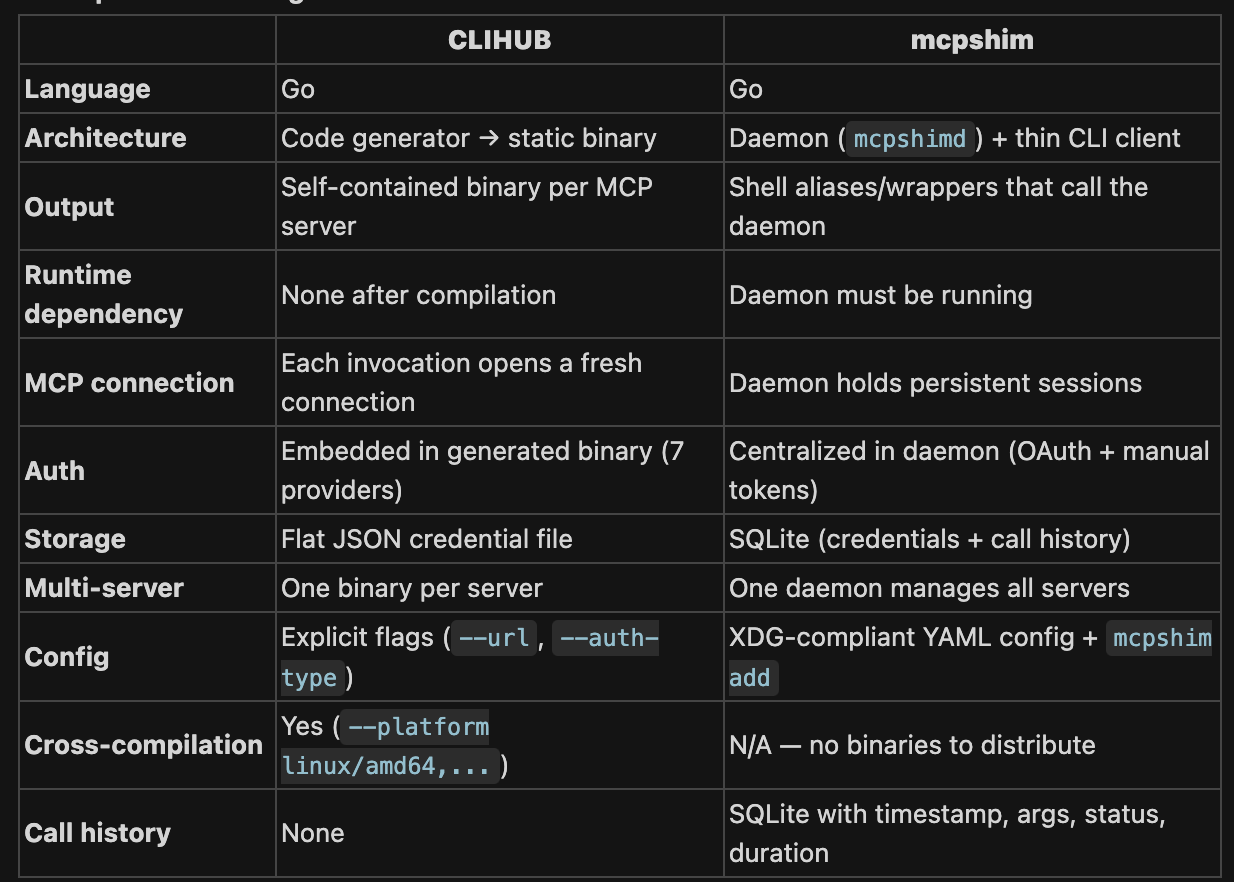
CLIHUB compiles MCP servers into portable, self-contained binaries — think of it like a compiler. Best for distribution, CI, and environments where you can't run a daemon.
mcpshim is a runtime bridge — think of it like a local proxy. Best for developers juggling many MCP servers locally, especially when paired with LLM agents that benefit from persistent connections and lightweight aliases.
I actually want to combine this and CLIHub into a directory where someone can download all the official MCPs or CLIs (or MCP to CLIs) with a single command
Probably oversold here because if you read the fine print, the savings only come in cases when you don't need the bytes in context.
That makes sense for some of the examples the described (e.g. a QA workflow asking the agent to take a screenshot and put it into a folder).
However, this is not true for an active dev workflow when you actually do want it to see that the elements are not lining up or are overlapping or not behaving correctly. So token savings are possible...if your use case doesn't require the bytes in context (which most active dev use cases probably do)*
Content advocates for freedom of information and technical transparency through comparative analysis of tool documentation methods. The post demonstrates how different approaches (MCP vs CLI) handle information disclosure.
FW Ratio: 67%
Observable Facts
Article compares how much information is disclosed upfront (MCP full schema vs CLI lazy loading).
Author name is clearly identified on the page.
Content is freely accessible without registration or payment requirement.
Code examples and technical details are fully shown rather than hidden behind paywalls.
Inferences
The detailed comparison of information disclosure methods suggests advocacy for efficient, transparent documentation practices.
Free access to technical analysis supports broader dissemination of information about tool capabilities and costs.
Content addresses fair compensation for work through detailed cost analysis of different approaches to tool integration. The post advocates for understanding true economic costs and efficiency of labor (agent computation time).
FW Ratio: 60%
Observable Facts
Article quantifies cost efficiency improvements (94% token savings), which is a form of economic analysis.
Author open-sourced the converter tool, contributing labor to a shared resource.
Detailed comparison of computational costs demonstrates attention to economic efficiency.
Inferences
The focus on cost efficiency suggests concern for fair allocation of computational resources and reducing unnecessary overhead.
Open-sourcing the converter indicates willingness to share the value of labor rather than exclusively monetize it.
Content demonstrates free expression through technical analysis and opinion on tool design efficiency. The author freely shares analysis and criticism of existing approaches.
FW Ratio: 75%
Observable Facts
Author openly publishes comparative technical analysis and opinions on MCP vs CLI approaches.
Critical assessment of tool design choices is presented without hedging or apparent editorial restriction.
Content is publicly indexed and accessible without registration or approval barriers.
Inferences
The direct publication of technical criticism and alternative approaches suggests freedom to express unpopular or novel opinions.
Content engages with cultural participation through technical contribution to AI/agent development community. The author participates in shared technical culture and shares innovations.
FW Ratio: 60%
Observable Facts
Author mentions open-sourcing the converter, contributing to shared technical resources.
Content participates in broader AI agent tool ecosystem discussion.
Technical innovation (CLI approach) is shared rather than proprietary.
Inferences
Open-sourcing work suggests participation in a commons-based technical culture.
Sharing of innovation supports collective advancement of the AI agent ecosystem.
Content implicitly supports education through knowledge sharing about technical tool design and efficiency. The detailed explanation of MCP vs CLI serves an educational function about cost optimization.
FW Ratio: 75%
Observable Facts
Article provides detailed technical explanations with examples and tables.
Code snippets are formatted clearly for readability and understanding.
Comparison tables breakdown complex concepts into accessible components.
Inferences
The pedagogical structure suggests intent to educate readers about tool efficiency, supporting the right to education.
Open-source release of CLIHub converter enables community participation in technical culture. Content is freely shared, supporting collective cultural advancement.
Author is identified by name, suggesting recognition of individual contribution. Open-source contribution (CLIHub converter) is mentioned, indicating labor is being shared.
Content is freely accessible without paywall or registration gatekeeping. Author identity (Kan Yilmaz) is clear and linked content is openly available.
Title claims '94% Cheaper' repeatedly; actual token savings range from 92-98% depending on tool count, and comparison omits considerations where MCP may be superior
loaded language
Phrases like 'Every AI agent using MCP is quietly overpaying' and 'the tax' frame MCP as exploitative without acknowledging trade-offs
build 1ad9551+j7zs · deployed 2026-03-02 09:09 UTC · evaluated 2026-03-02 13:57:54 UTC
Support HN HRCB
Each evaluation uses real API credits. HN HRCB runs on donations — no ads, no paywalls.
If you find it useful, please consider helping keep it running.