Summary Digital Autonomy & Family Privacy Advocates
This technical blog post documents a decade-long project to build a family e-paper dashboard system that respects privacy and dignity in the home. The content advocates for intentional technology design that serves human needs rather than exploiting attention, demonstrates deep engagement with knowledge-sharing and education, and exemplifies participatory engagement in technical culture and community. The post's free and accessible format supports Article 19 (freedom of expression) and Article 26 (education), while its underlying design philosophy reflects values of privacy protection (Article 12) and respect for family life (Article 16).
This is super cool, and I wish something like this existed at my place, as it enables information sharing without the need for phones/actual screens that shine in your face when the lights are low or tempt you to doomscroll.
That said, the large primary display this uses is $2000. That's very hard to justify for any "normal" household, and that's without any mounts, backend, services etc.
~3000€ to show information in some random places in the house even though the household members have a device with a screen called a smartphone next to them 24/7 ?
Well, it's cool, but the usability of it all is below average.
Declutter your life and don't install any more screens in your home ;)
This is awesome but I still find it funny that he said he wants a healthy relationship with technology then goes and fits his entire house out with technology. It doesnt seem like any of this would really be useful as you'd have to enter all the useful data manually(calendar).
For example the washing machine. You dont need real time information because you know how long it takes since you've done it 1000s of times and it beeps. All these things are just managed in our heads subconsciously.
Information radiators are basically 80% of the reason I try to keep tabs on wireless power delivery. Then a Kia and Hyundai vendor thought they were going to get their wireless charging added to the EV6 and Ioniq vehicles and that’s the other 20%. Essentially they removed the transformer from the PSU and moved it to the air gap between the charging coil and the vehicle to halve the parasitic losses. You’d have a car you didn’t even need to plug in.
I’ve been following Information Radiators since practically the beginning, and wiring has always been one of its problems. First networking and now power. In homes, but also in office spaces. The best locations for radiators are often the worst for wiring.
And eInk displays move the needle because you have a device that can go completely to sleep between updates, which means it can trickle charge.
Wall-mounted dashboards are a huge life-hack, especially if you have a family. We got a 37-inch touchscreen one, running DAKBoard.
We have several kids and have been organizing our daily todos and calendars on it for several years. We used to drop the ball quite a bit due to a hectic schedule and the dashboard has helped us tremendously. Since it is mounted in the kitchen, being able to pull up recipes is a plus.
This is cool. I bought an Inkplate for this and got as far as writing a custom image format suitable for e-ink sort of things (4-bit RLE; trivial to decode, but good compression for diagram/text type images).
Where I got stuck is calendars... Unfortunately Google Calendar doesn't seem to provide a nice API where you can just say "give me the events for these days", instead you can only download all of your events in iCal format. It's then extremely non-trivial to convert that information into "what is happening today".
This is really cool. With a newborn in the home I've been really thinking about projects like this recently. When you have a newborn things are so busy and hectic that it's easy to get overloaded and for things to slip through the cracks so I've been really wishing I had a dashboard like this somewhere to remind me that we need to take the dogs out or show how long it's been since the baby last ate or whatnot.
I really like epaper displays for all of the reasons mentioned in the article. Shame the patent locks continue to keep prices high even though the core technology has improved enough for prices to drop.
A few years ago I came into a couple of e-ink displays that had been previously used for storefront/product pricing. The hardware to drive them was locked down but I was able to reverse engineer the panel by finding a datasheet that was close enough and hacking up an adafruit thinkink. I had a lot of fun writing my own driver/abstraction layer. I originally intended to support a bunch of different panels but ran out of steam after the first one did exactly what I wanted.
I solved a problem (not really the same problem as this, mind you) for my family
using a much older technology. I bought a big pane of glass from the hardware store,
built a wooden frame for it with a shelf for an eraser and dry markers.
I hung it up in the kitchen and now when we need to leave "sticky" notes to each
other we just write on it. We keep our shopping list on it, we write small poems
and draw funny faces. It has become a fun ephemeral space for communicating.
For those on a budget, I highly recommend checking eBay for old e-ink readers. Many of them can be rooted and are by far the most affordable way to get e-ink (plus compute).
> It has a powerful function: if the status on the display is blank, the house is in a “healthy” state and does not need any attention. This approach of only showing what information is relevant in a given moment flies right in the face of how most smart homes approach communicating their status
the best user experience is sometimes no experience
This is almost the only kind of application that makes a 'fridge with a gigantic screen on it' make sense. But do said fridges have the ability to display useful information like this?
Someone I know has one of these fridges and the screen is just a toy. Doesn't really show anything useful for day-to-day life. Although it provides amusement when it detects bald heads as eggs.
Haven't followed e-ink display for a while but $2000 for the display is surprising! Assumed these e-ink displays were much cheaper these days.. and I thought we were closer to color ones as well. Great project though!
Really happy to see e-paper home dashboards as a thing. Last month or so I saw a Melbourne public transport one, which showed times of the next tram/bus.
We tried something like this using the iPad when we moved to a new country with one year old, because there was so much to figure out and track, it felt impossible. Now after a year, it’s gone and things are more internalised.
That’s my main concern with spending time and money building something like this. We thought about everything from commercial displays, Raspberry PI and e-Paper to finally just buying a 10$ wall mount for IPad. After sometime it becomes redundant as routine is formed.
If the author happens to read this, do tell us how have you found the motivation to keep using this? Doesn’t it get redundant after a point? I get adding new information and adapting routines around can be a factor, but people don’t really change that much
The insight that a blank status area means "the house is healthy" is the best part of this whole project imo. Most smart home dashboards try to show you everything all the time and you just end up tuning it all out. This is basically the opposite approach and it makes way more sense for something you glance at 50 times a day.
I tried something similar with a Kindle a few years back for just weather + calendar and ran into the same jailbreak maintenance hell. Ended up giving up. The Visionect displays look great but $1000+ per screen is brutal. Curious if the author has looked at the Waveshare e-paper panels driven by an ESP32, they're like $40-80 for a 7.5" screen and you can do partial refreshes. Obviously way smaller than the Boox but might work as a cheaper bedroom/mudroom option for people who want to build something like this without spending $3k.
You can make smaller ones for much much less. I’ll post pics of mine a bit later but waveshare 7.5” display in a photo frame and almost any ESP32 dev board and you are set for less than $100 (along with suitable HomeAssistant and ESPhome infrastructure to support it).
The original article is a very slick bit of work, so well done
I think with more outdoor activities, it's important to know what is waiting you in a few hour. For cycling example wind and rain information is rather good to know.
This may due to geographical differences, not sure where you live versus OP but I have lived in at least 7 different cities throughout my life and in some of those I had to deal with really unpredictable weather whereas in others it was easier to just wing it and not regret leaving with a jacket or umbrella for example.
It could be that they live in an area with more variable or more unpredictable weather than you. Or that they are much more outdoorsy. Or something else altogether. I'm surprised by your surprise. People live wildly different lifes and have correspondingly wide-ranging needs and preferences.
There are several ways to get all events for the day! The easiest one in my experience has been to write a simple Apps Script project and expose that as a published Web App[1]. That moves all of the oAuth logic and Calendar API plumbing to Google's server-side code, and gives you a simple long URL that contains exactly what data you want.
Something like:
```
function doGet(req) {
  let start = new Date();

  start.setHours(12,0,0,0);

  let end = new Date(start);

  end.setDate(end.getDate() + 3);

  let events = CalendarApp.getEvents(start, end);

  return ContentService.createTextOutput(events.map(x => x.getTitle()));
> For example the washing machine. You dont need real time information because you know how long it takes since you've done it 1000s of times and it beeps.
It beeps, on the other end of the house (or on another floor), where it's inaudible. (And, thankfully, where the loud sounds of it operating are also inaudible.)
> All these things are just managed in our heads subconsciously.
And when you remove the need to track that in your head, your head gets freed up for other things.
To be explicit, I don't like "smart appliances" that connect to a cloud server. I do like the idea of devices that can connect locally to something like Home Assistant.
I'm in Scotland. Looking outside and seeing blue skies does not mean it's safe to leave without a rain jacket, or a thermal layer. Seeing fog in the morning doesn't mean you don't need shorts for the afternoon. It being 0 outside today doesn't mean it won't be 10 degrees tomorrow. Knowing it's going to rain between 10 and 2 is good motivation to take the dog out before 10. Knowing it's going to rain on Sunday but be clear on Saturday is a good reason to book outdoor activites (golf) on Saturday instead.
That sounds really cool, though. I'm currently trying to "train" our kids to manage their own schedules, e.g. reminding me that they have somewhere to be instead of vice versa.
Maybe a wall-mounted solution would help put it front and center for them.
Pick up phone (may be in another room), unlock phone, open app, navigate to information in app (often fairly annoying due to modern low information density app design and multiple apps), return to original location.
It's a hobby but not for everyone. I mean if I could just throw away 3,000€ on random projects that might work or not I'd do it in a heartbeat. No different than buying a run down Porsche for 5,000€ and spending 40,000€ on restoration to original. Every hobby is like that but with different entry price points. There is a reason knitting is more popular than something like this (and even that has price tiers from 3€ for an acrylic yarn to upwards 100€ for luxury merino wool yarn)
OP's Timeframe looks rad, but yes on the pricy side. check out trmnl .com for smaller / less expensive options and self hosted options. (disclaimer: i'm on the team)
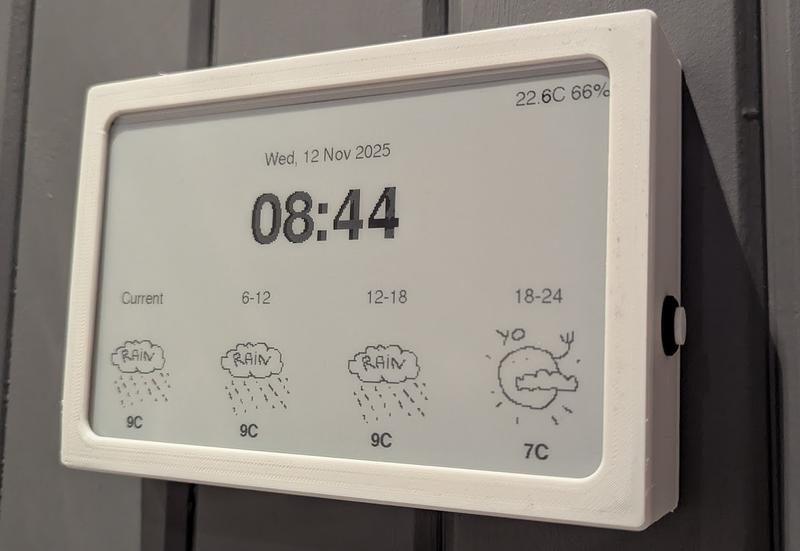
I made this thing [1] for us, it uses a cheap 10" e-paper display off aliexpress, an ESP32 and a couple of I2C sensors. The case is 3D-printed. It runs on two 18650 batteries, and all in all it cost less than 100$. The OpenWeather API is free for personal use.
For you, maybe, but outsourcing ambient awareness of my environment is what’s finally enabled me to take that leap to a 10x dev. Well, that, and cranial cooling fins.
I got the battery extension and it lasted more than 10 months (I have it on a 30 minute refresh). Highly recommend TRMNL if you want something to hack on without fussing with hardware.
You have a newborn, and you think spending time installing and maintaining something that displays the calendar around the house is a good use of time?
Next time you decide to post something so snarky, maybe remember where you are. This is hackernews, people experiment and build things. Not always for the right reasons, and that's fine. If you don't like it, just move along. There's plenty of people, myself included, that are thankful for posts like this.
Depends - my family almost always has events coming up for something, so there is always something that needs attention in the next couple days. The display has no idea when I look at it if I'm asking "is there anything tonight" - that is things where the answer is sometimes no; or if I'm asking what is planned for the rest of the week.
Likewise there are always chores. Cleaning the litter box is daily, but in the rare case where everything that must be done is done there are things like washing windows that can wait a few months but if I have time...
It is also useful to put a clock on this display - computers are accurate unlike the battery powered things you have on the wall. (though it is a matter of taste if this is worth it...)
And at least where I live I always need to know the weather for the day (if storms are expected it might be deadly to ride my bike to work even though it is fine now).
Sure knowing the temperature and relative humidity in the house isn't really useful if the system is working correct. Though it does settle some arguments so it is worth having anyway.
You might be interested in knowing about https://trmnl.com. No affiliation beyond interest in buying a few in the future. They have a 10.3" version in the works.
My solution was to buy a used Samsung tablet with OLED screen, and control the display on with motion sensors. It sits in the hallway, above the keys drawer. The screen is on only when someone's walking nearby, and around eye level when you go pick up the keys. Designed the dashboard based around muted colours on black background, with brights reserved for "hey pay attention to this" data. And most importantly, the screen is not visible from any spot you're likely to stay at for a longer time. As for mounting, I used calipers, 3d printer and some double sided tape. It's not completely seamless, but damn close for ~10% of the effort.
Disclaimer: I use Home Assistant too and I'm guilty of all these things.
Home Automation is just a hobby like "productivity" tools or going all in your coffee setup. You tell yourself you are saving energy, or freeing up your mind from remembering mundane tasks but in reality it's just like a model train set.
It's fun to set up, play around and maintain it for some people. If you'd do the math of setting up hundreds of dollars worth of smart appliances, bulbs, hubs and thermostats to tweak your heaters slightly while you are not at home...it will probably take decades to break even, if at all.
The post directly exercises and advocates for freedom of expression. The author publicly shares technical knowledge, design decisions, and implementation details. The statement 'I continue to receive significant interest in the project' and reference to Hacker News discussion shows engagement with public discourse.
FW Ratio: 57%
Observable Facts
The post is publicly accessible without registration, paywall, or authentication barriers.
The author documents and shares complete technical implementation details, design decisions, and source code references.
The post references discussion on Hacker News, indicating active participation in public discourse.
No observable terms of service restricting republication or commentary.
Inferences
The decision to publish complete technical details demonstrates commitment to knowledge-sharing and public benefit.
The public access model facilitates readers' right to receive and share information.
The open discussion of technical choices invites critical feedback and dialogue.
The post explicitly engages with education and knowledge-sharing. The author documents the complete technical journey, including failures, iterations, and solutions. The level of detail provided (code snippets, architecture decisions, library references) enables others to learn and replicate similar systems.
FW Ratio: 63%
Observable Facts
The post documents a complete technical learning journey over a decade, including multiple design iterations and failures.
The author provides specific technical details: Ruby on Rails, IMGKit, Home Assistant, Visionect API, Docker, Rufus Scheduler.
Code examples are embedded and explained (e.g., the template sensor example).
The author references libraries created: 'I extracted into visionect-ruby', enabling others to benefit from the work.
The post is accessible to readers without registration or paywalls, supporting free access to educational content.
Inferences
The detailed documentation of technical decisions serves an educational function, enabling others to learn from the author's experience.
The open-source ethic (library extraction, code examples) supports knowledge sharing as a human right.
The accessibility of the writing and structure supports Article 26's goal of enabling everyone to participate in cultural and technical knowledge.
The post engages directly with Article 27 themes: participation in cultural and scientific life. The author builds and shares technology that improves daily life, participates in maker communities (local library makerspace), and shares innovations. The conclusion explicitly states the project 'improves my family's daily life' and demonstrates ongoing development.
FW Ratio: 57%
Observable Facts
The author explicitly used community resources: 'I designed wood enclosures and laser-cut them at the local library makerspace'.
The project is positioned as a passion project that improves family life and is being brought to market to benefit others.
The post concludes: 'Building Timeframe continues to be a passion of mine. While my day job has me building software for over a hundred million people, it's refreshing to work on a project that improves my family's daily life.'
The author shares technical knowledge that enables others to participate in similar innovation.
Inferences
The engagement with maker communities and public knowledge-sharing reflects active participation in cultural and scientific life.
The decision to document and potentially commercialize the project demonstrates a commitment to sharing technological advancement with others.
The framing of innovation as a form of practical problem-solving that serves family and community aligns with Article 27's vision of cultural participation.
The post demonstrates commitment to adequate standard of living. The project directly improves family quality of life by providing essential information (calendar, weather, home status) in a way that respects the home environment. The design ensures the family can maintain a healthy domestic space.
FW Ratio: 60%
Observable Facts
The project was built to solve a genuine family need: having useful information without screen intrusion in living spaces.
The design includes features specifically for health and comfort: non-backlit displays to avoid glare and sleep disruption, information displayed only when relevant to reduce cognitive load.
The post addresses practical home systems: laundry monitoring, door lock status, dishwasher reminders—all contributing to efficient household functioning.
Inferences
The technology enables better household management and family well-being, supporting the right to adequate standard of living.
The focus on 'only showing what information is relevant in a given moment' reduces stress and supports mental health and comfort.
The post demonstrates a commitment to family privacy in technology design. The opening about keeping the bedroom screen-free and designing a home dashboard that respects domestic space reflects values of privacy protection.
FW Ratio: 60%
Observable Facts
The post explicitly prioritizes family privacy: 'We kept our bedroom free of any screens, charging our devices elsewhere overnight.'
The project solves a privacy problem—wanting calendar/weather without screen presence in intimate spaces.
No tracking pixels, cookies, or analytics platforms are observable on the domain.
Inferences
The design philosophy reflects Article 12's principle that family life should be protected from arbitrary interference.
The absence of tracking mechanisms supports privacy by default.
The post advocates implicitly for thoughtful technology integration in family life. The opening intent statement ('we set an intention to have a healthy relationship with technology in our home') reflects values aligned with human dignity and the right to private, family-centered life.
FW Ratio: 50%
Observable Facts
The post explicitly states the authors 'set an intention to have a healthy relationship with technology in our home' and kept their bedroom free of screens.
The project was motivated by personal family needs rather than commercial exploitation.
Inferences
The deliberate approach to technology adoption reflects values of autonomy and family privacy that align with the UDHR's foundational dignity principles.
The narrative frames technology as a tool responsive to human needs rather than as an imposition.
The post implicitly argues that technology development carries responsibility to respect human dignity and community. The author's design philosophy prioritizes family well-being and unobtrusive integration, suggesting ethical technology use.
FW Ratio: 50%
Observable Facts
The author explicitly prioritizes human-centered design: the project was built because 'we missed our calendar and weather apps' but wanted them in a way that respected the family environment.
The design philosophy reflects restraint: 'if the status on the display is blank, the house is in a healthy state and does not need any attention', minimizing information overload.
Inferences
The deliberate approach to technology suggests ethical reasoning about impact on community and family.
The commitment to making the system reliable and maintainable reflects responsibility to users.
The post centers family life and marriage as the foundation for technology design. The opening statement about married life and shared intention reflects respect for family as a unit.
FW Ratio: 50%
Observable Facts
The post begins: 'When Caitlin and I got married a decade ago, we set an intention to have a healthy relationship with technology in our home.'
Inferences
The family-centered design philosophy treats the family unit as the primary stakeholder, consistent with Article 16's protection of family.
The post demonstrates reliance on social and international order to realize rights. The author was able to pursue this project because he lived in a stable community (Colorado) with access to technology and market systems.
FW Ratio: 50%
Observable Facts
The project relies on multiple commercial and open-source ecosystems: Visionect, Boox, Home Assistant, TRMNL, Google Calendar, Apple Weather, Sonos.
Inferences
The project's existence and success depend on social and technical order that enables commerce, innovation, and international collaboration.
The site provides unrestricted public access to the full technical article without paywalls, registration, or censorship mechanisms. The free access model enables information sharing and reception.
build 1ad9551+j7zs · deployed 2026-03-02 09:09 UTC · evaluated 2026-03-02 10:41:39 UTC
Support HN HRCB
Each evaluation uses real API credits. HN HRCB runs on donations — no ads, no paywalls.
If you find it useful, please consider helping keep it running.